Every traveler has done the cable dump: unzip your bag at TSA, pull out a tangled nest of chargers and adapters, hold up the security line, stuff it back in wrong. The fix costs $25 and takes 5 minutes to set up. The Bagsmart Electronics Travel Organizer is the most popular solution for good reason — it's spacious, well-organized, and makes airport security faster by design.
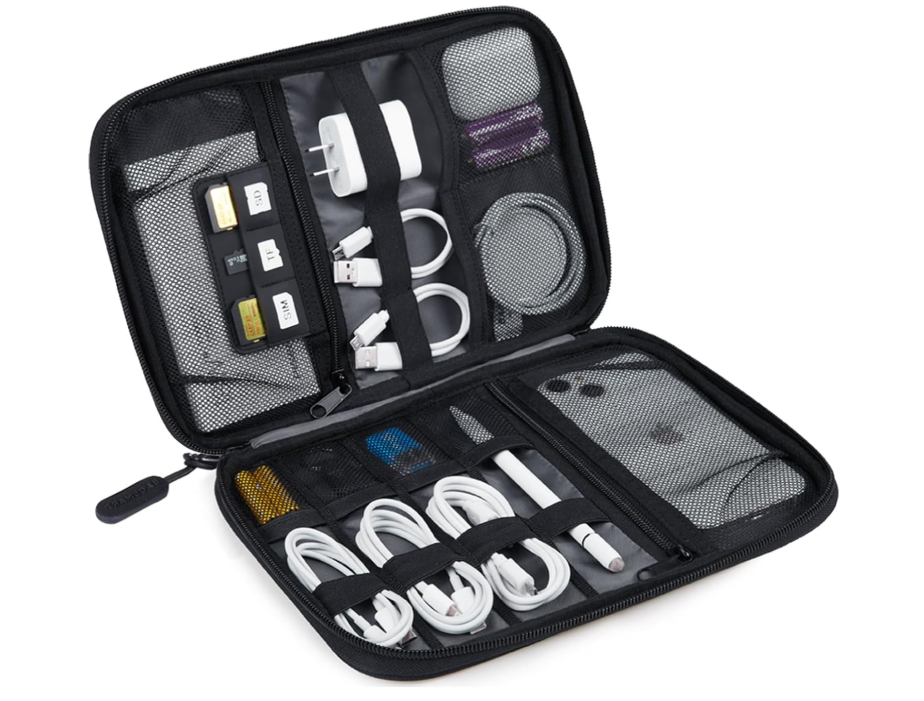
Bagsmart Electronics Travel Organizer (Large)
⚡ TripPacked Verdict
The best cable and electronics organizer for most travelers under $30. Solves the tangled cable problem completely and makes TSA security genuinely faster. The tablet slot is a bonus. Only downside: the large size is genuinely large — if you pack ultra-light, the medium may be more appropriate.
The TSA Problem This Solves
TSA requires electronics larger than a phone (laptops, tablets) to be removed from your bag and placed in a separate bin. But cables, chargers, and adapters trigger false positives in the X-ray — the scanner can't see through a tangled mess of wires cleanly, so agents often pull bags for manual inspection.
When your electronics are in a single organized pouch, TSA agents can see exactly what it is and wave it through. Multiple reviewers report a noticeable reduction in bag checks since switching to an organizer.
✅ What It Gets Right
Layout That Makes Sense
The large Bagsmart opens flat like a book, revealing two primary layers and a front zippered pocket. The layout is designed by someone who actually travels: cables coil into elastic loops without tangling, the power bank slot is accessible without unfolding everything, and the mesh pockets show contents at a glance.
Capacity Without Bulk
The large version holds: a power bank, travel adapter, 3–4 cables, earbuds case, SD cards, phone stand, and a small tablet — all organized and accessible. When closed, it fits in the top compartment of a standard carry-on or in the front pocket of most backpacks.
Cable Management
Six elastic loops in various sizes keep cables from tangling with each other. The difference between coiled cables in loops vs. thrown in a bag is the difference between finding your cable immediately vs. a 2-minute untangling session every time.
TSA-Friendly Design
Pull the whole pouch out at security, place it in the bin, and go. No removing individual items, no explaining what everything is. Multiple reviewers specifically mention this as the feature that sold them after the first use.
❌ Where It Falls Short
Large Size Is Genuinely Large
The large version is 12.8" × 9" when open — bigger than a legal-size notepad. For minimalist packers or those with only 2–3 cables, this is overkill. The medium version (10" × 7") is a better fit for most solo travelers with just a phone, laptop, and tablet setup.
No Dedicated Hard Drive Pocket
External hard drives, SSDs, and camera batteries don't have dedicated padded slots. They can be placed in the mesh pockets but aren't protected from impact. For photographers with expensive storage, a dedicated hard-drive case alongside this organizer makes sense.
What to Pack in It
Typical setup for a week-long trip:
- Travel adapter (like the EPICKA — fits perfectly)
- USB-C to USB-C laptop cable
- Lightning or USB-C phone cable
- GaN multi-port charger
- Power bank (10,000–20,000mAh)
- Wireless earbuds case
- SD card + reader (photographers)
- Watch charger
What Travelers Are Saying (15,000+ Reviews)
How It Compares
| Organizer | Price | Size | Tablet Slot | Verdict |
|---|---|---|---|---|
| Bagsmart Large | ~$25 | 12.8" × 9" | ✅ Up to 12.9" | Best for full tech setups |
| Bagsmart Medium | ~$22 | 10" × 7" | ✅ Up to 9.7" | Best for minimalists |
| BUBM Double Layer | ~$20 | 11" × 7.5" | ❌ No | Budget option, less organized |
| Peak Design Tech Pouch | ~$60 | 9.5" × 6" | ❌ No | Premium build, compact |